| Author | 3DGURU Dia’a el khawaldeh |
| Hyperlink | http://www.khayma.com/cgwoods/3dlab/train-m-tut-guru.htm |
| Category | Animation |
| Title | Train Moving tutorial |
TUTORIAL AS QUOTED FROM SOURCE
when the train moves … it’s parts don’t move instantly , they move gradiently , this may be done with python 🙁
but with this tutorial you will be able to make a one with lesser than 2 minutes … and of course without python .
ok create five cubes like this
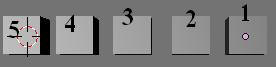
and make 2 the parent of 1 , and (3,2) and (4,3) and (5,4) .. to make it a parent select 1 then 2 , 1 will become dark pink and 2 will become light pink . now press control and P (alt and P to unlink)
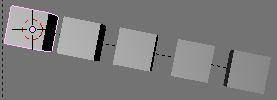
you should notice that there will be dotted lines between them
save your file and
select cube 1 and do as in the image
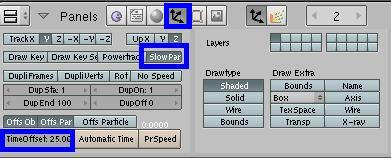
you will notice that if you moved the cube 5
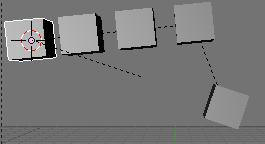
for the cube 2 define 20 as TimeOffset and keep the slow parent enabled
for the cube 3 define 15 as TimeOffset and keep the slow parent enabled
for the cube 4 define 10 as TimeOffset and keep the slow parent enabled
for the cube 5 define 0 as TimeOffset and make the slow parent Disabled
know move the cube with ipos or motion Actuators and see the results …. ha ha ha 🙂
applications
a worm
A train
a chain
a hanging lamp
have a nice blending

© blender-models.com 2016 | a blender 3D community resource
Privacy Policy